Arsip Tag: future

Binance Totorials, Guide to Trading on Binance Futures

How to open a Binance Futures account

Video tutorial available here
Before opening a Binance Futures account, you need a regular Binance account. If you don’t have one, you can go to Binance and click on Register in the top right corner of your screen. Then follow these steps:
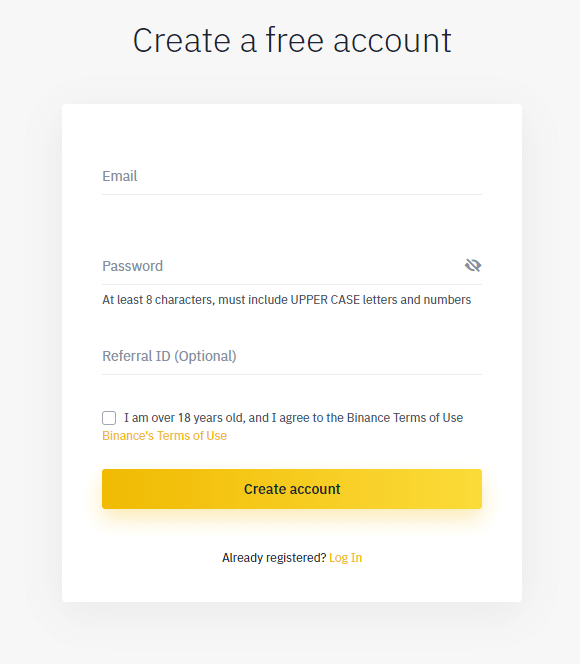
  1. Enter your email address and create a safe password. If you have a referral ID, paste it in the referral ID box. For a 10% discount on spot/margin trading fees, you can use this link.
    How to open a binance futures account
  2. When you are ready, click on Create account.
  3. You will receive a verification email shortly. Follow the instructions in the email to complete your registration.
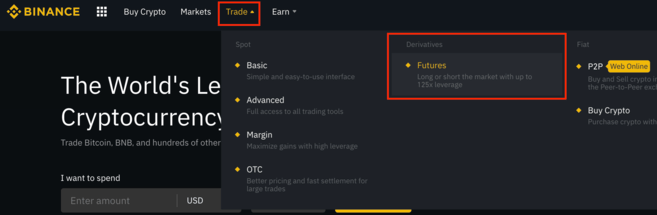
Next, log in to your Binance account, move your mouse to the bar at the top of the page, hover over Trade, and click on Futures.

Once you are on the Binance Futures page, you should be able to see the first two characters of your email address associated with your account in the top right corner.
How to open a binance futures account
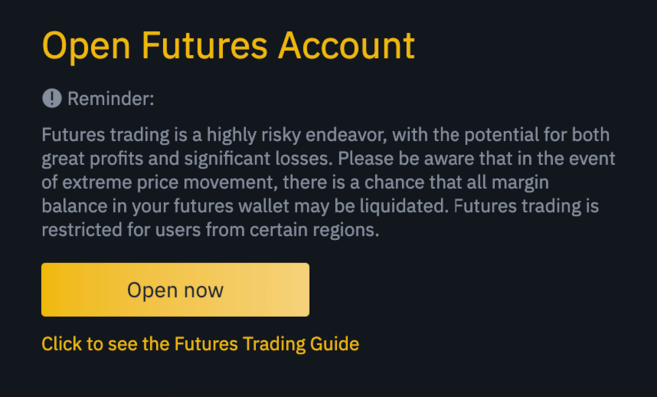
Click on the Open now button in the bottom right corner to activate your Binance Futures account. And that’s it. You’re ready to trade!

How to open a binance futures account
If you are not familiar with trading futures contracts, we recommend reading the articles What Are Forward and Futures Contracts?, and What Are Perpetual Futures Contracts? before getting started.
You may also refer to the Binance Futures FAQ to get an overview of the contract specifications. 
If you would like to test out the platform without risking real funds, you can try out the Binance Futures testnet

How to fund your Binance Futures account

Video tutorial available here
You can transfer funds back and forth between your Exchange Wallet (the wallet that you use on Binance) and your Futures Wallet (the wallet that you use on Binance Futures).

If you don’t have any funds deposited to Binance, we recommend reading the guide How to Deposit on Binance.
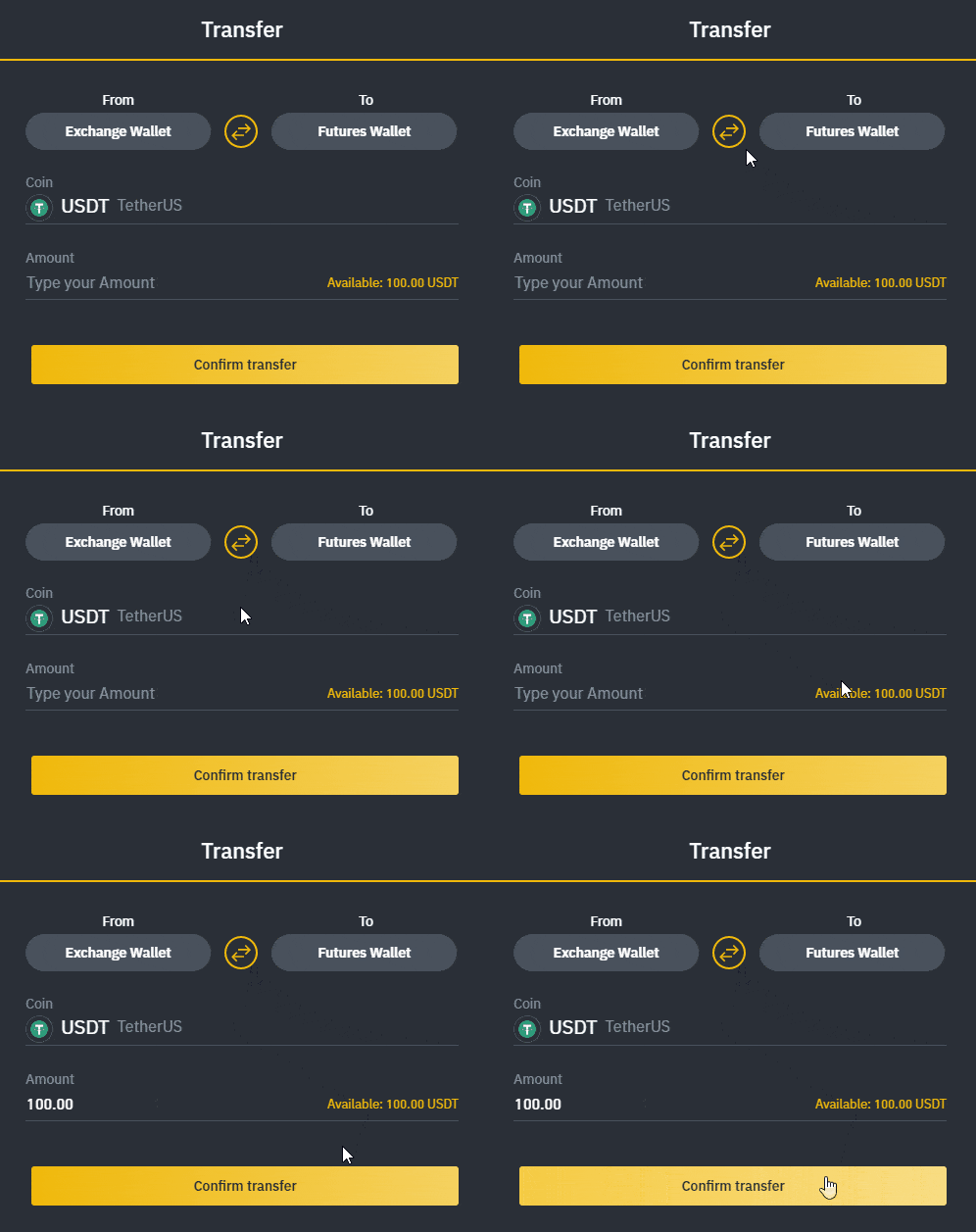
To transfer funds to your Futures Wallet, click on Transfer in the bottom right corner of the Binance Futures page. Set the amount that you would like to transfer and click on Confirm transfer. You should be able to see the balance added to your Futures Wallet shortly. 

How to open a binance futures account

Binance Futures interface guide


How to open a binance futures account

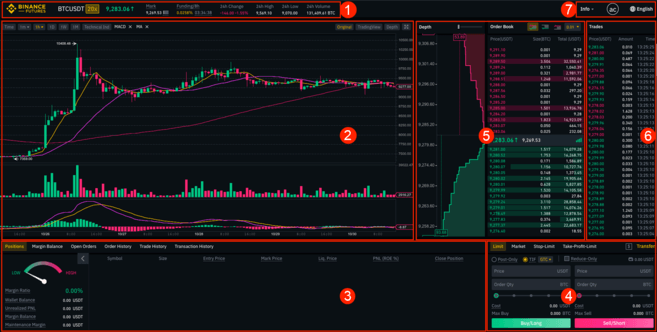
  1. This is where you can:
    1. Choose the contract you’d like to trade, adjust your leverage (20x by default), and switch between cross margin and isolated margin.
    2. Check the Mark Price (important to keep an eye on, as liquidations happen based on the Mark Price).
    3. Check the expected funding rate.
    4. Monitor your position in the auto-deleverage queue (important to pay attention to during periods of high volatility).
    5. Check various other market data, such as 24h change and 24h volume.
  2. This is your chart. In the top right corner of this area, you can switch between the Original or the integrated TradingView chart, or get a real-time visual representation of the current order book depth by clicking on Depth.
  3. This is where you can monitor your trading activity. You can switch between the tabs to check the current status of your positions, your margin balance, see your currently open and previously executed orders, and get a full trading and transaction history for a given period.
  4. This is where you can enter your orders, and switch between different order types. This is also where you can check your fee tier, and transfer funds from your Binance account.
  5. This is where you can see live order book data along with a visualization of order depth. You can adjust the accuracy of the order book in the dropdown menu on the top right corner of this area (0.01 by default).
  6. This is where you can see a live feed of the trade history of Binance Futures.
  7. By hovering on Info, you can get access to the Futures FAQ, check the historical funding rates, and the current balance of the Insurance Fund. If you wish to log out of Binance Futures, you can also do that from here. 

How to adjust your leverage
Video tutorial available here
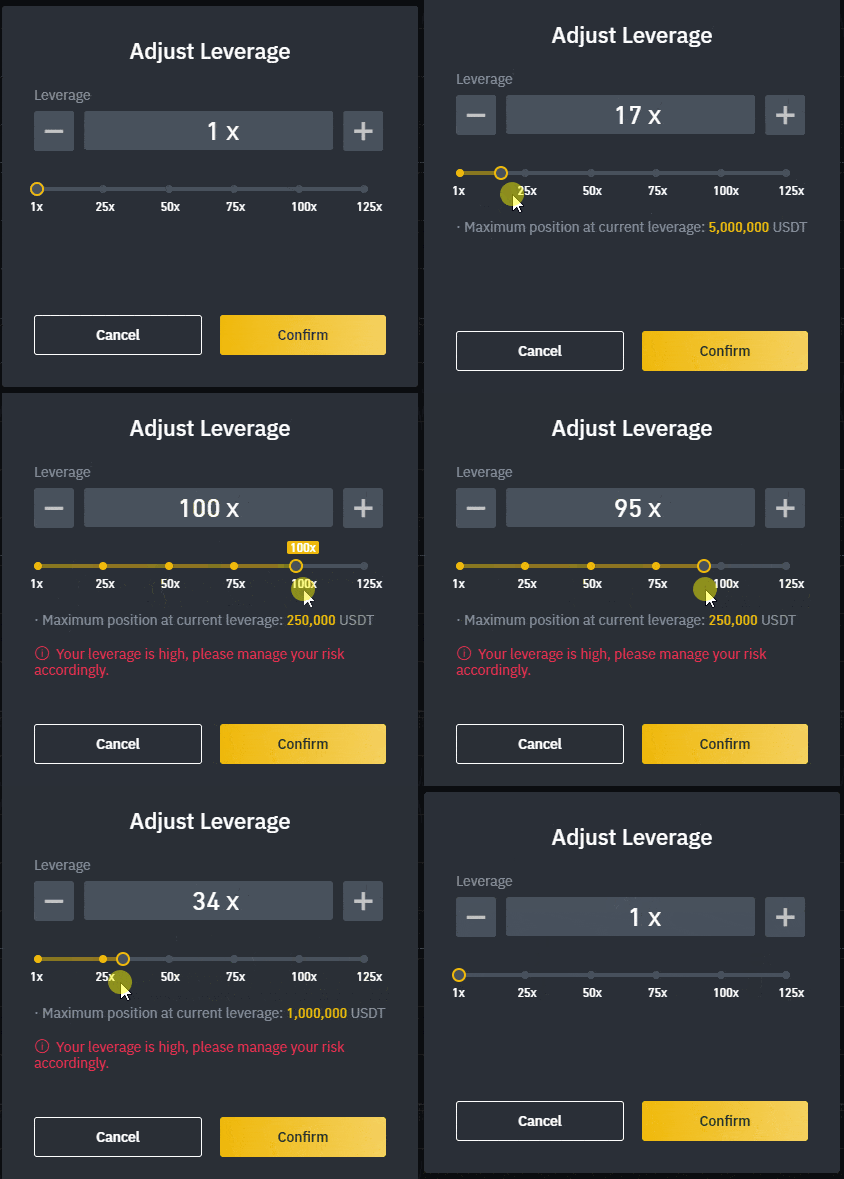
Binance Futures allows you to trade multiple contracts and manually adjust the leverage for each one. To choose the contract, go to the top of the page and hover over the current contract (BTCUSDT by default). 
To adjust the leverage, click on the yellow box indicating your current leverage amount (20x by default). Specify the amount of leverage by adjusting the slider, or by typing it in, and click on Confirm.

How to adjust your leverage

It’s worth noting that the larger the position size is, the smaller the amount of leverage is that you can use. Similarly, the smaller the position size, the larger the leverage you can use.
Please note that using higher leverage carries a higher risk of liquidation. Novice traders should carefully consider the amount of leverage that they use. 

What is the difference between the Mark Price and Last Price?
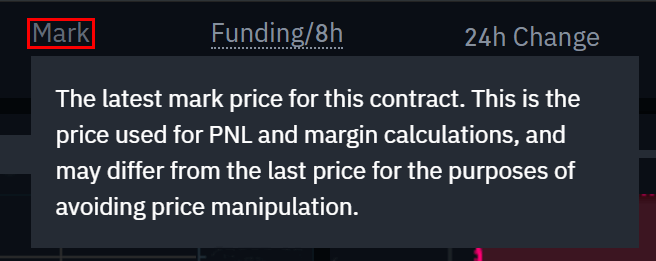
To avoid spikes and unnecessary liquidations during periods of high volatility, Binance Futures uses Last Price and Mark Price.
The Last Price is easy to understand. It means the Last Price that the contract was traded at. In other words, the last trade in the trading history defines the Last Price. It’s used for calculating your realized PnL (Profit and Loss).
The Mark Price is designed to prevent price manipulation. It’s calculated using a combination of funding data and a basket of price data from multiple spot exchanges. Your liquidation prices and unrealized PnL are calculated based on the Mark Price.

What is the difference between mark price and last price

Please note that the Mark Price and the Last Price may differ. 
When you set an order type that uses a stop price as a trigger, you can select which price you would like to use as the trigger – the Last Price or the Mark Price. To do this, select the price you wish to use in the Trigger dropdown menu in the order entry field.

Binance Futures Banner

What order types are available and when to use them?

There are six order types that you can use on Binance Futures:
  • Limit: A limit order is an order that you place on the order book with a specific limit price that is determined by you. When you place a limit order, the trade will only be executed if the market price reaches your limit price (or better). Therefore, you may use limit orders to buy at a lower price, or to sell at a higher price than the current market price.
  • Market: A market order is an order to buy or sell at the best available current price. It is executed against the limit orders that were previously placed on the order book. When placing a market order, you will pay fees as a market taker.
  • Stop-Limit: The easiest way to understand a stop-limit order is to break it down into stop price, and limit price. The stop price is simply the price that triggers the limit order, and the limit price is the price of the limit order that is triggered. This means that once your stop price has been reached, your limit order will be immediately placed on the order book.

    Although the stop and limit prices can be the same, this is not a requirement. In fact, it would be safer for you to set the stop price (trigger price) a bit higher than the limit price for sell orders, or a bit lower than the limit price for buy orders. This increases the chances of your limit order getting filled after the stop price is reached.

  • Stop-Market: Similarly to a stop-limit order, a stop-market order uses a stop price as a trigger. However, when the stop price is reached, it triggers a market order instead.
  • Take-Profit-Limit: If you understand what a stop-limit order is, you will easily understand what a take-profit-limit order is. Similarly to a stop-limit order, it involves a trigger price, the price that triggers the order, and a limit price, the price of the limit order that is then added to the order book. The key difference between a stop-limit order and a take-profit-limit order is that a take-profit-limit order can only be used to reduce open positions.
    A take-profit-limit order can be a useful tool to manage risk and lock in profit at specified price levels. It can also be used in conjunction with other order types, such as stop-limit orders, allowing you to have more control over your positions.
    Please note that these are not OCO orders. For example, if your stop-limit order is hit while you also have an active take-profit-limit order, the take-profit-limit order remains active until you manually cancel it.
    You can set a take-profit-limit order under the Stop Limit option in the order entry field.
  • Take-Profit-Market: Similarly to a take-profit-limit order, a take-profit-market order uses a stop price as a trigger. However, when the stop price is reached, it triggers a market order instead.
    You can set a take-profit-market order under the Stop Market option in the order entry field.

How to use the Binance Futures calculator

Video tutorial available here.
You can find the calculator next to the Transfer button in the bottom right corner. It allows you to calculate values before entering either a long or a short position. You can adjust the leverage slider in each tab to use it as a basis for your calculations.
The calculator has three tabs:
  • PNL – Use this tab to calculate your Initial Margin, Profit and Loss (PnL), and Return on Equity (ROE) based on intended entry and exit price, and position size. 
  • Target Price – Use this tab to calculate what price you’ll need to exit your position at to reach a desired percentage return.
  • Liquidation Price – Use this tab to calculate your estimated liquidation price based on your wallet balance, your intended entry price, and position size.


What is Post-Only, Time in Force and Reduce-Only?

When you use limit orders, you can set additional instructions along with your orders. On Binance Futures, these can either be Post-Only or Time in Force (TIF) instructions, and they determine additional characteristics of your limit orders.

Post-Only means that your order will always be added to the order book first and will never execute against an existing order in the order book. This is useful if you would only like to pay maker fees. You can quickly check your current fee tier by hovering over the $ sign next to the Transfer button.

TIF instructions allow you to specify the amount of time that your orders will remain active before they are executed or expired. You can select one of these options for TIF instructions:
  • GTC (Good Till Cancel): The order will remain active until it is either filled or canceled.
  • IOC (Immediate Or Cancel): The order will execute immediately (either fully or partially). If it is only partially executed, the unfilled portion of the order will be canceled.
  • FOK (Fill Or Kill): The order must be fully filled immediately. If not, it won’t be executed at all.
Additionally, when you use either a limit or a market order, ticking the Reduce-Only checkbox will ensure that new orders you set will only decrease, and never increase your currently open positions.

When are your positions at risk of getting liquidated?

Liquidation happens when your Margin Balance falls below the required Maintenance Margin. The Margin Balance is the balance of your Binance Futures account, including your unrealized PnL (Profit and Loss). So, your profits and losses will cause the Margin Balance value to change.
The Maintenance Margin is the minimum value you need to keep your positions open. It varies according to the size of your positions. Larger positions require higher Maintenance Margin.
You can find a useful tool under the Positions tab at the bottom left corner of the page. It helps you quickly track the current risk of your open positions getting liquidated. If your Margin Ratio reaches 100%, your positions will be liquidated.

When are your positions at risk of getting liquidated

When liquidation happens, all of your open orders are canceled. Ideally, you should keep track of your positions to avoid auto-liquidation, which comes with an additional fee. If your position is close to being liquidated, it may be beneficial to consider manually closing the position instead of waiting for the auto-liquidation.

What is auto-deleveraging and how can it affect you?

When a trader’s account size goes below 0, the Insurance Fund is used to cover the losses. However, in some exceptionally volatile market environments, the Insurance Fund may be unable to handle the losses, and open positions have to be reduced to cover them. This means that in times like these, your open positions can also be at risk of being reduced.
The order of these position reductions is determined by a queue, where the most profitable and the highest leveraged traders are at the front of the queue. You can check your current position in the queue by hovering over the indicator at the top of the page.

what is auto-deleveraging

What Are Forward and Futures Contracts?

What Are Forward and Futures Contracts?

Essentially, forward and futures contracts are agreements that allow traders, investors, and commodity producers to speculate on the future price of an asset. These contracts function as a two-party commitment that enables the trading of an instrument on a future date (expiration date), at a price agreed upon at the moment the contract is created.

The underlying financial instrument of a forward or futures contract can be any asset, such as equity, a commodity, a currency, an interest payment or even a bond.

However, unlike forward contracts, the futures contracts are standardized from a contract perspective (as legal agreements) and are traded on specific venues (futures contracts exchanges). Therefore, futures contracts are subject to a particular set of rules, which may include, for instance, the size of the contracts and the daily interest rates. In many cases, the execution of futures contracts is guaranteed by a clearing house, making it possible for parties to trade with reduced counterparty risks.

Although primitive forms of futures markets were created in Europe during the 17th century, the Dōjima Rice Exchange (Japan) is regarded as the first futures exchange to be established. In early 18th-century Japan, most payments were made in rice, so futures contracts started to be used as a way to hedge against the risks associated with unstable rice prices.

With the emergence of electronic trading systems, the popularity of futures contracts, along with a range of use-cases, became widespread across the entire financial industry.

Functions of futures contracts

Within the financial industry context, futures contracts typically serve some of the following functions:

Hedging and risk management: futures contracts can be utilized to mitigate against a specific risk. For example, a farmer may sell futures contracts for their products to ensure they get a certain price in the future, despite unfavorable events and market fluctuations. Or a Japanese investor that owns US Treasury bonds may buy JPYUSD futures contracts for the amount equal to the quarterly coupon payment (interest rates) as a way to lock the value of the coupon in JPY at a predefined rate and, thus, hedging his USD exposure.

Leverage: futures contracts allow investors to create leveraged positions. As contracts are settled at the expiration date, investors are able to leverage their position. For example, a 3:1 leverage allows traders to enter into a position three times larger than their trading account balance.

Short exposure: futures contracts allow investors to take a short exposure to an asset. When an investor decides to sell futures contracts without owning the underlying asset, it is commonly referred to as a “naked position”.

Asset variety: investors are able to take exposure to assets that are difficult to be traded on the spot. Commodities such as oil are typically costly to deliver and involve high storage expenses, but through the use of futures contracts, investors and traders can speculate on a wider variety of asset classes without having to physically trade them.

Price discovery: futures markets are a one-stop-shop for sellers and buyers (i.e. supply and demand meet) for several asset classes, such as commodities. For example, the price of oil can be determined in relation to real-time demand on futures markets rather than through local interaction at a gas station.

Settlement mechanisms

The expiration date of a futures contract is the last day of trading activities for that particular contract. After that, trading is halted and the contracts are settled. There are two main mechanisms for futures contracts settlement:

Physical settlement: the underlying asset is exchanged between the two parties that agreed on a contract at a predefined price. The party that was short (sold) has the obligation to deliver the asset to the party that was long (bought).

Cash settlement: the underlying asset is not exchanged directly. Instead, one party pays the other an amount that reflects the current asset value. One typical example of a cash-settled futures contract is an oil futures contract, where cash is exchanged rather than oil barrels as it would be fairly complicated to physically trade thousands of barrels.

Cash-settled futures contracts are more convenient and, therefore, more popular than physical-settled contracts, even for liquid financial securities or fixed-income instruments whose ownership can be transferred fairly quickly (at least comparing to physical assets like barrels of oil).

However, cash-settled futures contracts may lead to manipulation of the underlying asset price. This type of market manipulation is commonly referred to as “banging the close” – which is a term that describes abnormal trading activities that intentionally disrupt orders books when the futures contracts are getting close to their expiration date.

Exit strategies for futures contracts

After taking a futures contract position, there are three main actions that futures traders can perform:
Offsetting: refers to the act of closing a futures contract position by creating an opposite transaction of the same value. So, if a trader is short 50 futures contracts, they can open a long position of equal size, neutralizing their initial position. The offsetting strategy allows traders to realize their profits or losses prior to the settlement date.

Rollover: occurs when a trader decides to open a new futures contract position after offsetting their initial one, essentially extending the expiration date. For instance, if a trader is long on 30 futures contracts that expire in the first week January, but they want to prolong their position for six months, they can offset the initial position and open a new one of the same size, with the expiration date set to the first week of July.

Settlement: if a futures trader does not offset or rollover their position, the contract will be settled at the expiration date. At this point, the involved parties are legally obligated to exchange their assets (or cash) according to their position.

Futures contracts price patterns: contango and normal backwardation

From the moment futures contracts are created until their settlement, the contracts market price will be constantly changing as a response to buying and selling forces.

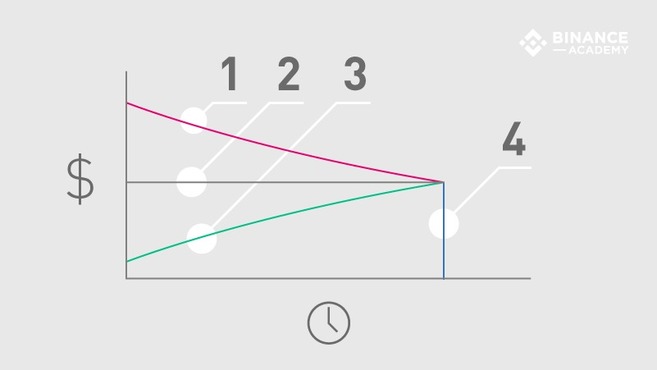
The relation between the maturity and varying prices of the futures contracts generate different price patterns, which are commonly referred to as contango (1) and normal backwardation (3). These price patterns are directly related to the expected spot price (2) of an asset at the expiration date (4), as illustrated below.

  • Contango (1): a market condition where the price of a futures contract is higher than the expected future spot price.
  • Expected spot price (2): anticipated asset price at the moment of settlement (expiration date). Note that the expected spot price is not always constant, i.e., it may change in response to market supply and demand.
  • Normal backwardation (3): a market condition where the price of futures contracts is lower than the expected future spot price.
  • Expiration date (4): the last day of trading activities for a particular futures contract, before settlement occurs.

While contango market conditions tend to be more favorable for sellers (short positions) than buyers (long positions), normal backwardation markets are usually more beneficial for buyers.

As it gets closer to the expiration date, the futures contract price is expected to gradually converge to the spot price until they eventually have the same value. If the futures contract and spot price are not the same at the expiration date, traders will be able to make quick profits from arbitrage opportunities.

In a contango scenario, futures contracts are traded above the expected spot price, usually for convenience reasons. For instance, a futures trader may decide to pay a premium for physical commodities that will be delivered in a future date, so they don’t need to worry about paying for expenses such as storage and insurance (gold is a popular example). Additionally, companies may use futures contracts to lock their future expenses on predictable values, buying commodities that are indispensable for their service (e.g., bread producer buying wheat futures contracts).

On the other hand, a normal backwardation market takes place when futures contracts are traded below the expected spot price. Speculators buy futures contracts hoping to make a profit if the price goes up as expected. For example, a futures trader may buy oil barrels contracts for $30 each today, while the expected spot price is $45 for the next year.

Closing thoughts

As a standardized type of forward contract, futures contracts are among the most used tools within the financial industry and their various functionalities make them suitable for a wide range of use cases. Still, it is important to have a good understanding of the underlying mechanisms of futures contracts and their particular markets before investing funds.

While “locking” an asset’s price in the future is useful in certain circumstances, it is not always safe – especially when the contracts are traded on margin. Therefore, risk management strategies are often employed to mitigate the inevitable risks associated with futures contracts trading. Some speculators also use technical analysis indicators along with fundamental analysis methods as a way to get insights into the price action of futures markets.